 Screen Settings
Too bright? Make any website comfortable in one tap.
Dim, Dark or Night any page, then forget about it. Screen Settings remembers your look for each site, so the web is easy on your eyes every time.
No account. No ads. Your settings stay on your device.
The long read that was too bright for bedtime
White backgrounds can be hard on the eyes, especially in the evening.
Keep readingThree looks. One tap.
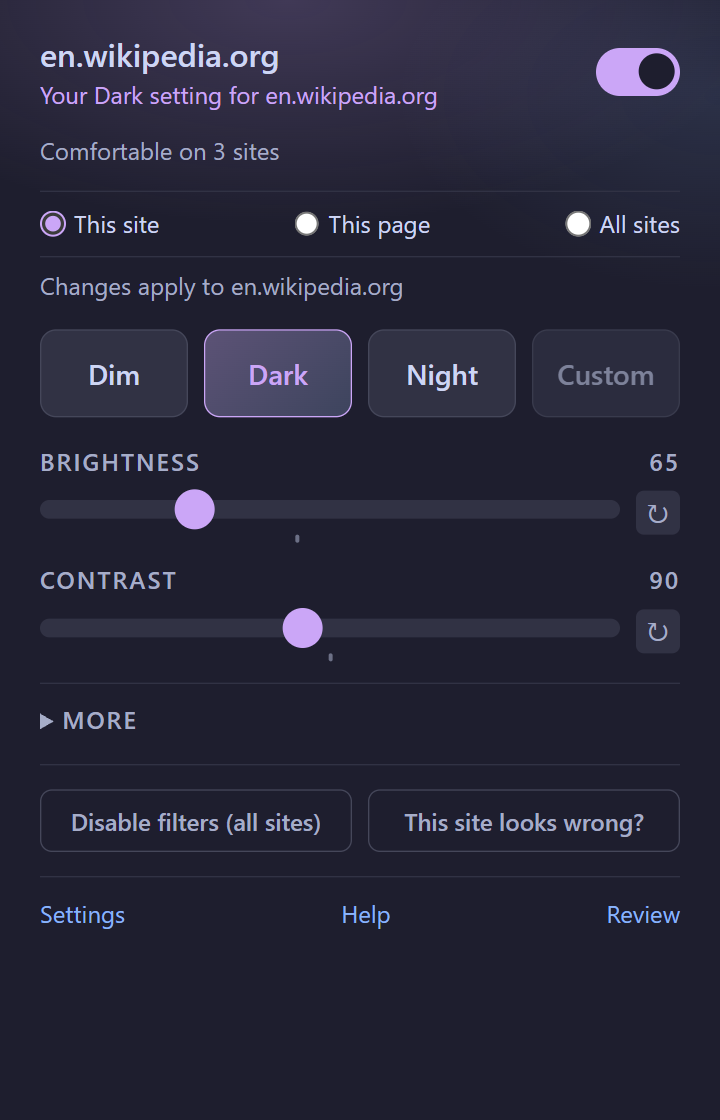
Pick a preset and you're done. Want something in between? Sliders are one click away.
Dim
A gentle step down from full brightness. Perfect for a bright room or a long reading session.
Dark
Dims the whole page and softens contrast, so white backgrounds stop glaring.
Night
Inverts colors for a true dark mode, while photos and video keep their normal colors.
Set it once. It's there next time.
Choose where a look applies and Screen Settings always tells you before you change anything.
- This site: every page on one website
- This page: just the page you're on
- All sites: one look everywhere
- Undo after every change, and a one-tap reset when a site looks wrong
Comfortable for everyone
Fine controls when you want them, and accessibility built in rather than bolted on.
Sliders for everything
Brightness, contrast, saturation, hue, sepia and zoom, saved per site.
Colorblind assist
Assist and simulation modes for protanopia, deuteranopia and tritanopia. These are approximate aids, not medical tools.
Easier reading
Reduce motion, underline links, stronger focus outlines and more readable text.
Keyboard friendly
Alt+Shift+O turns filters on or off. Alt+Shift+D cycles Dim, Dark and Night for the site.
Share your look
Send a link and a friend can add your settings in one click. Export or import your settings any time.
No flash
Your look is applied as the page loads, so you rarely see a bright frame first.
It changes how pages look. It never reads them.
- Your settings stay on your device
- We never collect the pages or sites you visit
- Anonymous usage counts are optional and off by default
- No ads, no selling data, no account
What it asks your browser for
storage: remember your settings.
scripting: apply your look to tabs already open when you install.
alarms: send optional usage counts once a day.
All websites: apply your saved look on the sites you visit.
Questions
Quick answers. More on the Help page.
Is it really free?
Yes. Screen Settings is free with no account and no ads.
Will it work on every website?
It works on almost every regular page. Your browser's own pages (such as chrome:// or about: pages), the extension stores and a few other protected pages can't be changed by any extension. If a site looks wrong, tap "This site looks wrong?" in the popup and tell us.
What if I don't like a change?
Every change shows an Undo button for a few seconds. You can also reset a single site or switch the filters off for everywhere.
Does it slow pages down?
No. It adds a single style to the page. Nothing visible is ever added to the page.
What does Night do to photos?
Night inverts the page for dark mode, then flips photos, video and canvas back so they look normal.
Does it collect any data?
Not unless you opt in to anonymous usage counts, and even then never the sites or pages you visit.
Give your eyes a break.
Add Screen Settings and dim your first bright page in seconds.